Wednesday, March 30, 2016

Finding the Balance in Assessing- Week 10

Finding the Balance


As a student in K to 12 it seems all we get done in any given year is testing. Students feel overwhelmed by the over testing of standardized tests that goes on in our schools today. Teachers and school do need to collect data to see where their students are but I think the current state of affairs is too heavy for children. Some school districts even test their students multiple times a year with standardized tests. My belief is that we should test children to see if they understand the material but only when it is absolutely necessary. 
 
I really like assessing students in a very casual way such as using formative assessments. Asking a question to the class while going through a lecture or asking a student to solve a problem on the board, are great ways to gage how the class as a whole are understanding the material. On the other hand, there are times when a teacher needs to use chapter tests, or summative assessment, to see where the students are. This helps the teacher see over a chunk of time how well the students are doing in a given area of study. 
 
In our lecture video this week we were introduced to two tools teachers can use as a formative assessment in the classroom, PearDeck and EduCanon. PearDeck allows the teacher to ask questions and the students are able to answer in real time. With this site the students are able to place their dot where they please and they are able to write in responses to help spark discussion in the classroom. EduCanon in the same way allows the teacher to survey the class. The teacher asks the class a question verbally and the students are able to pick "thumbs up" or "thumbs down."  I think both of these tools are a really great thing to use in the classroom. These are great ways to keep the students involved in the class discussion.
 
 
Throughout Scott's lecture, I found many things interesting. The main thing that stood out to me is the fact that there are technologies such as these two in which a teacher can use to get feedback from her students. From this lecture I also got that assessments shouldn't be something students always fear; but instead they should have fun with these tools and the students should feel as though they are learning and they are challenged but in a good productive way. 

Friday, March 18, 2016

Knitting: Major Project- Week 9


My Knitting Journey


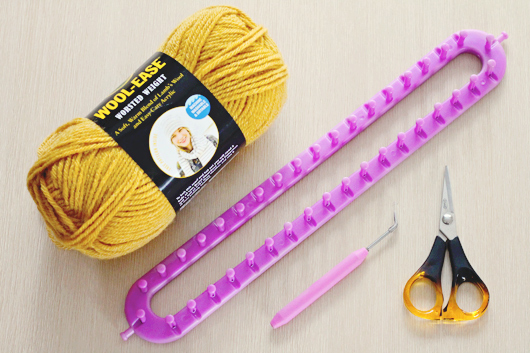
At the start of this project, I thought that I wanted to learn how to knit using the traditional knitting needles. But then I talked to my friend who knits and she informed me that it is much easier to start off learning to knit from a loom then to work my way up to using just needles. I found a very helpful video on YouTube that walked me step by step, without the help from the video I would have been lost.

At first learning how to weave the yarn through the loom was somewhat difficult. But the good thing is, once a person gets used to the flow of the loom and the yarn then it becomes very easy. I found myself becoming relaxed and having a self of accomplishment the more rows I had.

In the video the woman suggested that a person uses two sets of yarn in order to make the scarf thicker so I did what she suggested.
 
I have really enjoyed the last week of working on my knitting. I find it almost therapeutic to be able to do something as simple as wrapping string around some pegs and have the end result be a scarf to keep someone warm.
 
I hope I will video my progress as I go. I might also finish this scarf then start something use. I might possibly try new stitches with the knitting to see it I can make the look of the scarf different. All in all I am finding great joy in working on this project.


Thursday, March 17, 2016

Emaze Presentation Review- Week 9


Emaze Presentation Review


This week I decided to do my Cool Review on a presentation site called emaze. I really loved this site; this site is very similar to Prezi, but I think it might be easier to use and share. This tool gives you the opportunity to create a presentation that is more than just a plain PowerPoint. It has more of a flow with the presentation that makes what you are talking about visually appealing. It allows you to pick out a layout and you are able to add you own text and images as you please. Here is a link to what I did with the tool. 10/10 for this tool for me!!
 
I would definitely use this tool in my classroom. If I was working with older students I think having my lectures using this site would keep this all engaged. They would enjoy it because it is something a little different than they are used to and it feels like they are riding along with the information because of the transition that are in between the slides.   
 
As for my students using this tool, I would say that would have to depend on how old they are. Since I am early childhood, which is a range from age 3 to grade 3 and potentially through grade 5, I would not let my preschoolers use this. But if I was teaching 4th or even 5th grade I would definitely have my students use this tool. I think a child who is in 5th grade would enjoy and flourish with a tool like this, because I think many times we limit the abilities that our students have because we think they are too young to have the necessary skills. So yes, I would use this tool with my older students because I think they would enjoy the challenge and opportunity.


Wednesday, March 16, 2016

Learning Spaces for the 21st Century Learner- Week 9


Learning Spaces for the 21st Century Learner


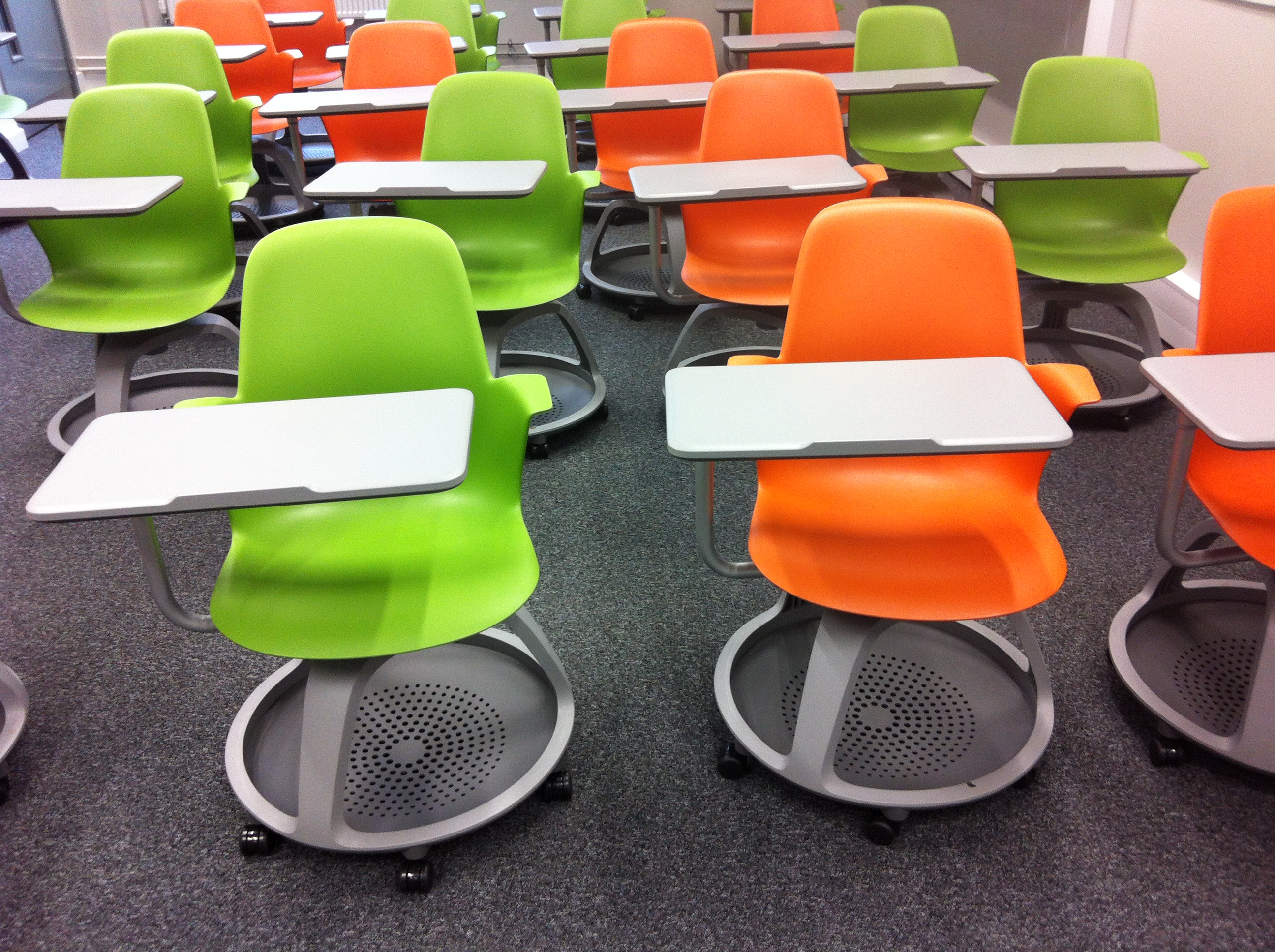
Being  a student in so much technological change can lead one to except more in the classroom as well. Today's students want a more hands on and engaging classroom environment than the traditional classroom set-up can provide. So it is our job as educators to make a positive change in physical space of the classroom to better fit the needs of our students.
 
 
"The days of the single desk and chair are gone, according to Herskowitz. He said he envisions a time when all K-12 classrooms are developed around the concept of collaboration--between student and teacher and among the students themselves." -Bridget McCrea
Creating learning spaces for our students allows us to think beyond the straight rows in stationary desks. Many students find group work a bother because of how difficult it is to rearrange the desks to be able to have group work. But if we were able to provide the students with desks that are light and ones with wheels for easy maneuverability then the students might be more willing to do these sorts of activities. Learning spaces are made to encourage collaboration among the student. It helps with providing an ease to transition from one activity to another.  In these learning spaces, we need to challenge the assumption of all students learn the same way. Learning spaces allow students to figure out what works for their special needs. Learning spaces also help the students figure out way they want to do their school work and projects.
 
Another way to encourage collaboration in the classroom is to use Google Apps for Education (GAFE). These should be integrated in to the layout of the room through having certain sections of the room for certain things for the children to do. GAFE are great for teacher who want their students to have a document in which they can all contribute to and feel as though they all have a voice in the classroom, for just one example.


The University of Akron does provide some informal learning spaces for their students to use in places like the library, and the Student Union. At these places they have furniture where students have the ability have study groups and where students can work together. These fit my needs because some days I need to find a space where I can get away and be by myself. And these spaces are perfect because there are so many and they are spread out enough that makes it nice to be able to have your own place to do work for school.

Sunday, March 13, 2016

Major Project Introduction- Week 8

 
Major Project Introduction


 For my major project I plan to learn how to knit a scarf using a loom. I was going to try to use knitting needles but I talked to people who knit and they said that knitting with the loom is much easier. So I am using their advice and I will be trying to make a scarf by the end of this major project with a knitting loom. I am very excited to start this process because I have always wanted to learn how to knit. I hope to learn the basics with the loom and then eventually work my way into using just the needles. I will be documenting my journey with videos and pictures of what I have learned throughout the process. I am very excited to get started, so keep up with my blogs to see how this goes for me. Wish me luck!!


ThingLink Review- Week 8


ThingLink Review
 
 
This week I decided to do a video tool. I chose ThingLink for this tool. At this website you are able to have a background picture with dots on certain parts of the picture that has links, pictures, or videos about the topic of your choosing. I really enjoyed using this website, and I think that the idea of the product you are able to make is really cool as well. I did my sample on knitting since that is my major project topic.
 
This tool would be very helpful to use in the classroom as part of a presentation. I think the students would like the look of the presentation if it was done this way. One of the examples that I saw was a map of a city and then there were dots with pictures that were linked to that certain area of the city. So this tool could definitely be used by a social studies teacher.
 
If I did have my students use this tool I think I would have to do it as a class project. I would have to project it on the screen so the whole class would be able to help me design the photo. I think that it might be too difficult for my young students to do it on their own, but I do think it would be very beneficial if we could do it as a class. 


Thursday, March 10, 2016

Do Not Accept "I'm Not Smart Enough"- Week 8


Do Not Accept "I'm Not Smart Enough"


This week we heard from Jon Smith about the importance of getting students engaged and motivated about writing. During his lecture he talked about his personal experience with dealing with students in the classroom. For the main portion of career he worked with students who were in the special education program. He could not get his students to write at all, even about things they liked. To relate to them he decided to have them publish their writings, in order to get the students to want to write. So the students wrote and edited the chapters of this first book together. Little did Jon know that this was just the start of his whole school district adopting his idea.
 
 
The most important thing that I was able to take away from Mr. Smith's video was the fact that we as teachers must be attentive to our students. We must always want what is best for them, and we must push them to do their absolute best at all times. If Mr. Smith didn't push his kids, they would have struggled all the way through school till graduation. It is easier to accept the fact that a group of kids aren't good at a subject, but when doing so it makes you except less of them as a student. Knowing that all children can and will learn, no matter what their difficulties should be number one to all teachers. We as teachers should not accept it when students say "I'm not smart enough" or "I can't do it," because we know deep down that all children have a desire to learn and grow. Never giving up on our students is a big take away from Mr. Smith's lecture. 

Following Mr. Smith's example, we as future educators can incorporate technology and online resources into our classroom everyday. We could do so by incorporating eBooks into the class resources. This can be used in the same way as Mr. Smith did; allowing the children to create their own books for anyone to access. But we could also use eBooks to help those who have trouble reading perhaps. Some eBooks provide tutors or other helpful tools such as sounding out words with the children to help them understand what is written.  eBooks are also interactive, so the children are able to become more involved with the text, rather than just reading from a piece of paper.